How to Check NOL Card Travel History in 2026?
Want to see where your Nol credit went? Your Nol card travel history shows every trip, with the date, time, station and fare deducted. This guide shows how to check it online and in the RTA Dubai app, plus how to move a balance to a new card.
Check Nol Card Travel History In Dubai
Checking NOL card travel history provides us insights about daily commuting and expenses. RTA introduces several easy ways to check your NOL details. Some of the seamless methods are given here:
Nol Card travel history Check Online:
Users can now check their NOL card details at any time and from anywhere. Online portals like RTA are accessible to all commuters to keep an eye on their records. Follow this step-to-step guide:
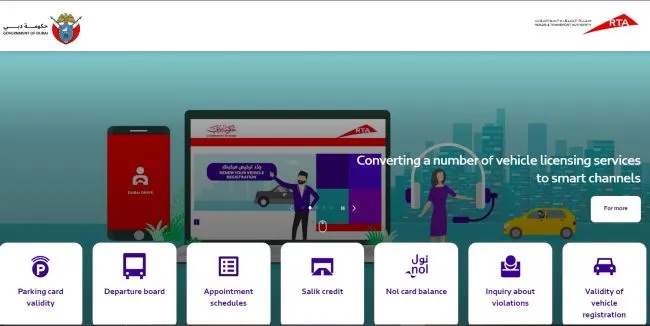
- Visit the “RTA official website” on your smartphone.
- Go to Public Transport, then Nol Cards and Services, then Nol Card Transaction History.
- Enter your 14-digit Nol Tag ID from the back of the card.
- Complete the CAPTCHA and click Next.
- Choose the date range you want to see.
- On clicking this button, the screen displays all the recent records like date, time, mode of transport fare deduction, etc.
Nol Card travel history Check by RTA Smart App:
Roads and Transportation Authority Dubai has developed a user-friendly app to operate NOL cards on the go. This smart app is compatible for both Android and iOS users making it easily accessible.
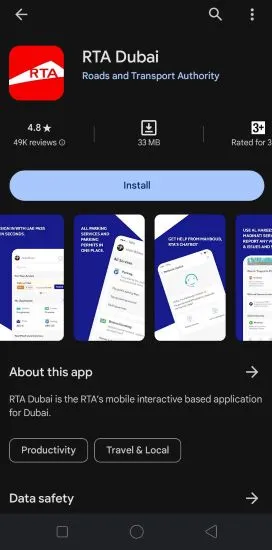
- Firstly install the RTA smart app from the Google Play store or Apple store.
- Now log in with your registered RTA account. If you don’t have an active account, select the sign-up option to get one.
- Once login is completed you are navigated to your profile
- Go to “transaction history”.
- Click on the History button to get all the details about the NOl card travel history.
Ticket Vending Machines at Metro Stations
Tap your card on any ticket vending machine at a metro or bus station to see your current balance and expiry date. For a full list of past trips, use the RTA website or the RTA Dubai app.
Types Of Nol Card
There are many types of Travel Nol Cards. You can select from four types of Nol Cards in the UAE based on your specific needs and preferences.
1. Silver Nol Travel Card
The Silver Nol Card provides a convenient electronic wallet with a 5-year validity period and an initial value of AED 19 for just AED 25.
2. Red Nol Card Travel
You can choose the Red Nol Ticket, a flexible paper ticket priced at AED 2. For this, you have reload options for single or day trips and it is valid for 90 days or 10 trips.
3. Blue Nol Travel Card
The Blue Nol Card offers a customizable travel experience with an electronic purse, subscription options, and 5 years of validity for AED 70.
4. Gold Nol Travel Card
The Gold Nol Card offers gold-class Metro seats for AED 25 plus a premium fare, valid for 5 years.
5. Special Nol Travel Card
The Special Design Nol Card offers a unique opportunity to select from 16 iconic Dubai designs, valid for 5 years.
6. Personalized Travel Gold Nol Card
The Personalized Gold Nol Card offers luxury access to Gold Class on Metro and Tram for AED 80, with an initial value of AED 20 and a 5-year validity.
Benefits to Check Nol Card Travel History
NOL card travel history is an incredible tracking option for regular users. It provides insights about expenses, and routes and helps in planning future travels. Following are some silent features of keeping an eye on your NOL details:
- Track transport expenses for better budget planning.
- Proper monitoring of past transactions to stay updated about total expenditures.
- Helps to analyze commuting habits for seamless travel.
- Detailed history helps to immediately resolve billing errors or disputes.
- A personal reminder of on-time recharging of NOL card.
Transfer Nol Travel Card Balance to Another Nol Card
If your old card is damaged or expired but still has credit, RTA can move the balance to a new card. Take both cards to a metro station ticket office or an RTA Customer Happiness Centre, or call RTA on 800 9090 to ask about the options for your card type. Registered Blue cards are the easiest to recover, because the balance is linked to your account.
Can You Get a Refund on a Nol Card?
RTA handles refunds of remaining Nol balance case by case, depending on the card type and its condition. Visit a ticket office or RTA Customer Happiness Centre with the card and your Emirates ID to ask.
To see how much credit is left, check your Nol card balance. Your history also shows bus trips on routes such as the N55.
FAQs
How can I check my NOL card travel history online?
You can check your NOL card travel history online by logging into the official RTA website or using the RTA Dubai app. Navigate to the NOL card section and select the option to view your travel history.
Is there a fee for checking my NOL card travel history?
No, there is no fee for checking Nol card travel history. It is free but you need a strong internet connection.
Can I check my NOL card travel history at ticket vending machines?
Ticket vending machines show your balance and expiry date, but for a full trip history use the RTA website or the RTA Dubai app.
Is it possible to receive a printed copy of my NOL card travel history?
Yes, it is possible to get a hard copy of your travel history. NOL card travel history can be checked online. But for specific reasons, a printed copy can be requested at RTA customer service centers.
Conclusion
This article walked you through the burning question of UAE residents and visitors, “How to Check NOL Card Travel History ?” Checking your travel history is important to commute patterns and manage expenses. To check it online, you can easily access your records through the RTA website or the RTA Dubai app.
If you monitor your travel history regularly, it provides useful insights into transportation budget, efficient planning, and quick resolution for billing errors. So, for peaceful travel on Dubai’s extensive public transportation network, stay informed about your NOL Card Travel History!